.webp)
Marketplace image requirements: how fashion brands export on-model imagery to every channel's spec

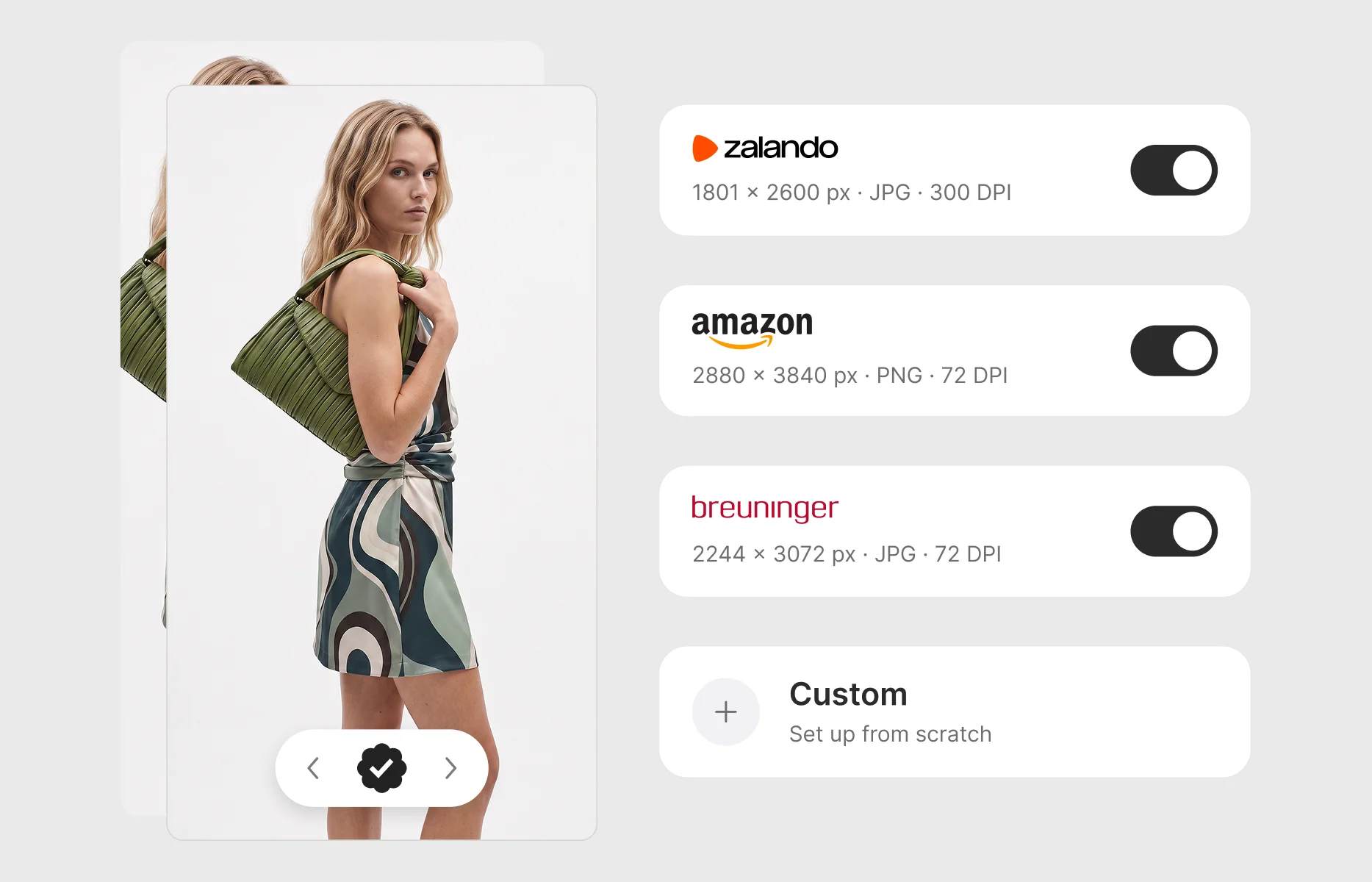
Every fashion brand selling through marketplaces knows the moment. The imagery is approved. The garment looks exactly right - the drape, the colourway, the framing all signed off. The collection is ready to go live. And then someone opens the channel requirements.
Zalando wants one set of dimensions. Amazon wants another, in a different file format. About You and Breuninger each have their own specifications again. The image that took a full production cycle to create now has to be prepared three, four, or five separate times before a single PDP goes live.
For a brand selling a handful of hero styles through one channel, this is an afternoon's work. For a brand launching a full collection across multiple marketplaces, it is a structural bottleneck that sits at the end of every single production cycle - invisible in the content budget, absent from the shoot schedule, and paid for in production hours every season. Ahead of peak trading, when every PDP needs to be live on day one, it is often the step that decides whether a launch date holds.
This article looks at why marketplace image requirements diverge, what the export step actually costs production teams, why the common workarounds fall short, and how brands are removing the step entirely by building channel specifications into the approval workflow itself.
Why does every marketplace have its own image requirements?
Marketplaces set image specifications for their own operational reasons, and those reasons rarely align with each other.
Each platform designs its PDP templates, zoom behaviour, and mobile rendering around a particular image geometry. A marketplace that built its product grid around a 3:4 portrait crop will require imagery in that ratio; one that optimised for a different layout will not. File format and compression requirements follow from each platform's own image pipeline - some ingest JPGs, others prefer PNGs. Resolution requirements reflect zoom functionality and display density targets that each marketplace has chosen independently.
None of these decisions is wrong. Each specification is rational within its own platform. The problem only appears from the brand's side of the table, where a single approved image has to satisfy all of them at once.
The result is that specifications differ across every dimension that matters for production:
- Pixel dimensions and aspect ratio. The same on-model image may need to ship in several different geometries, which is a reframing decision, not just a scaling one.
- File format. JPG for some channels, PNG or WebP for others.
- Resolution. Requirements vary by platform, from web-standard resolution through to print-grade specifications.
- Background and presentation rules. Channels differ on whether backgrounds stay as shot, are removed for transparency, or are replaced with a fixed colour - and some go further: certain platforms, such as Zalando, require desaturated still shots, while others, such as Amazon, require headless model imagery.
- File naming conventions. Each channel expects delivered files to follow its own naming structure, typically built from values like SKU, style code, position, and view code.
- Views. Channels can differ on which and how many views of a garment they expect on a listing.
To make this concrete: within Graswald AI, the Zalando export preset produces images at 1801 × 2600 px as JPG at 300 DPI. The Amazon preset produces 2880 × 3840 px as PNG at 72 DPI. About You is 1500 × 2000 px JPG at 96 DPI, and Breuninger is 2244 × 3072 px JPG at 72 DPI. Four channels, four entirely different output specifications - for the same approved image of the same garment. And because presentation rules like desaturation and headless cropping are part of the requirements, no amount of batch resizing alone can produce a compliant export. Multi-brand retailers face the mirror image of this problem when inconsistent vendor imagery arrives on their side.
What the export step actually costs production teams
The cost of channel-specific exports is easy to underestimate because it never appears as a line item. It hides inside post-production, and it scales multiplicatively rather than linearly.
The arithmetic is straightforward. A 500-SKU collection with four approved views per garment is 2,000 images. Sold through three marketplaces with different specifications, that becomes 6,000 exports. Add a fourth channel and it is 8,000. Every additional marketplace multiplies the entire export workload, and none of that multiplication produces anything new - it reproduces work that is already finished.
Three characteristics make this step particularly corrosive to production schedules:
It sits at the end of the cycle. Export preparation happens after generation, after review, and after approval - at exactly the point where the launch date is closest and the schedule has the least slack. A delay here is a delay to going live, not a delay to an internal milestone.
It is not creative work. The garment decisions, the styling, and the art direction are all complete. What remains is resizing, reformatting, renaming, and re-exporting - high-repetition tasks that consume the time of people hired to make creative decisions.
It multiplies with success. The more channels a brand sells through and the more of the catalogue it covers with on-model imagery, the heavier the export burden becomes. The step actively punishes exactly the growth it should be supporting.
What teams try instead - and why it falls short
Most production teams have already tried to tame this step. The workarounds cluster into three approaches, and each one solves part of the problem while leaving the structure intact.
Batch resizing scripts and Photoshop actions. Automated resizing handles the mechanical scaling well. What it cannot handle is the reframing: when the aspect ratio changes between channels, someone has to decide how the garment sits inside the new geometry - where the crop falls, how much headroom the framing keeps, whether the hem stays in frame. A script that scales blindly produces exports that are technically to spec and visually wrong. So the "automated" workflow quietly grows a manual review layer, and the time savings shrink.
DAM renditions. Digital Asset Management systems can generate output renditions, and for stable, simple transformations they work. But channel specifications live in the DAM as configurations someone has to build, maintain, and update when marketplaces revise their requirements or when the brand adds a channel. The knowledge of what each marketplace needs ends up embodied in one person's rendition setup - a fragile place for it to live. And because the DAM sits downstream of production, the export step still happens as a separate stage in a separate tool, with all the handover friction that fragmented tooling creates.
Outsourcing to an agency or a retoucher. This moves the work rather than removing it. The cost becomes visible (which is arguably an improvement), but the timeline problem gets worse: an external round trip is added to the end of the cycle, at the point closest to launch. And every new channel or specification change requires a new briefing.
The common thread is that all three approaches treat channel-specific exporting as a post-production problem - something to be handled after imagery is finished. That framing is the mistake. As long as the export step exists as a separate stage, it will keep consuming time at the worst possible point in the schedule.
The right approach: channel specifications at the point of approval
The structural fix is to move channel requirements upstream - out of post-production and into the platform where imagery is created and approved.
When the production platform knows each channel's specification, the export step stops being a stage and becomes a property of approval. An image that has been approved is, by definition, ready for every channel it is destined for - because the platform generates each channel's output from the approved source, to that channel's exact requirements, without anyone opening an editing tool.
This changes three things at once:
The knowledge problem disappears. Channel specifications live in the platform as presets rather than in scripts, rendition configurations, or one specialist's head. When a marketplace revises its requirements, the preset is updated once and every subsequent export follows it.
The reframing problem is handled where the context exists. The production platform knows the views, the framing, and the garment - so channel-specific outputs are generated from that understanding rather than blind-scaled after the fact.
The multiplication becomes free. Adding a channel means switching on a preset, not adding thousands of exports to the post-production queue. The workload no longer scales with channel count.
For brands already generating on-model imagery at scale - for instance, teams turning packshots into on-model imagery across thousands of SKUs - this closes the last gap between an approved image and a live PDP.
How marketplace export presets work in Graswald AI
This is the approach behind marketplace export presets in Graswald AI, which generate channel-ready exports from approved imagery - including on-model imagery created with the brand's own AI avatars (the exclusive, brand-calibrated avatars sometimes searched for as AI fashion models).
The system has two layers: account-level presets that define each channel's specification, and a per-product export flow that applies them.
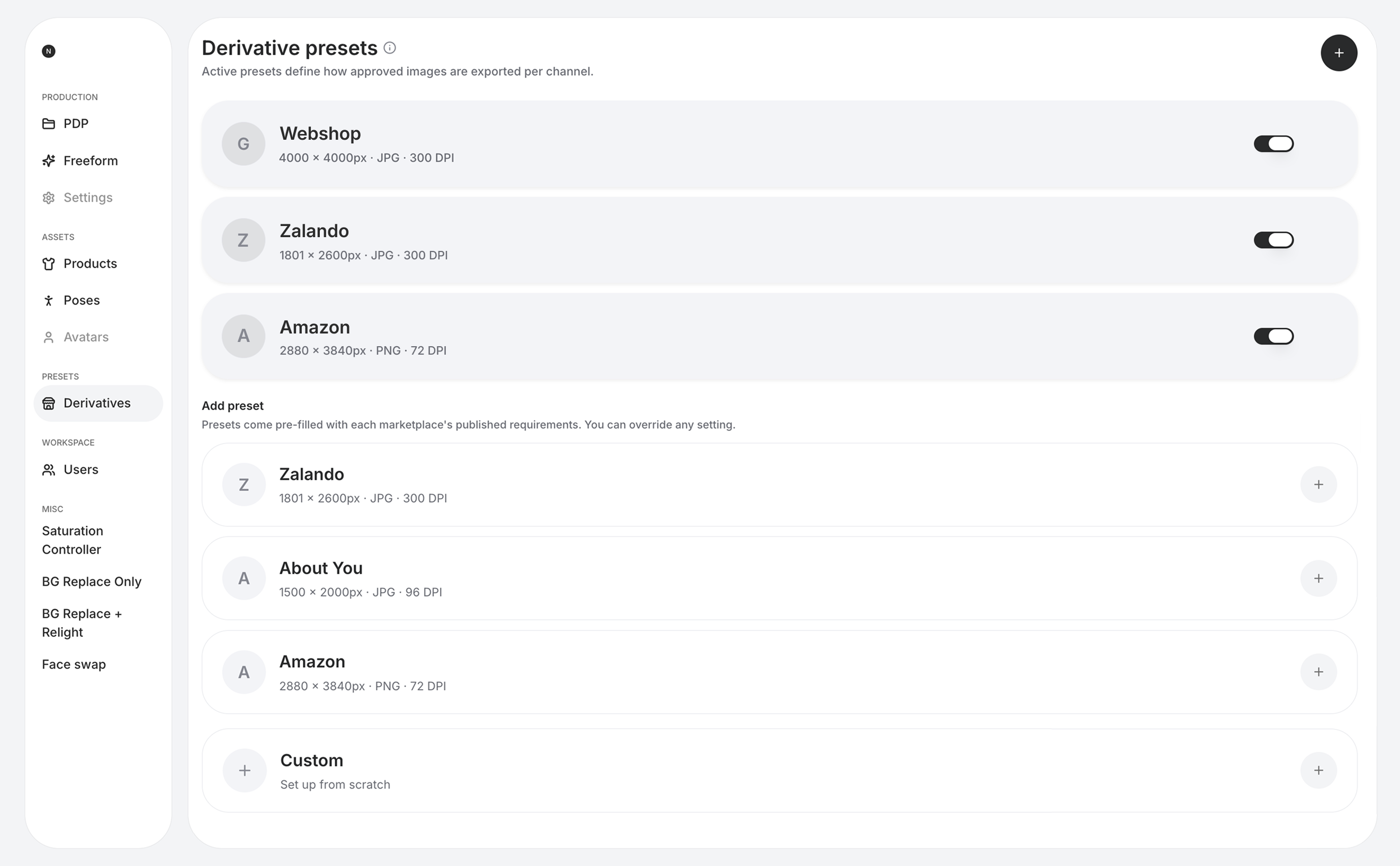
Presets define how approved images are exported per channel. In the platform these are called derivative presets - a derivative being the channel-ready file generated from an approved image. Each preset carries the channel's full output specification: pixel dimensions, file format (JPG, PNG, or WebP), colour profile (sRGB or Display P3), and resolution, along with background treatment - keep the original, remove it for transparency, or replace it with a fixed colour - and a separate desaturation option for still shots on platforms that require it, such as Zalando.
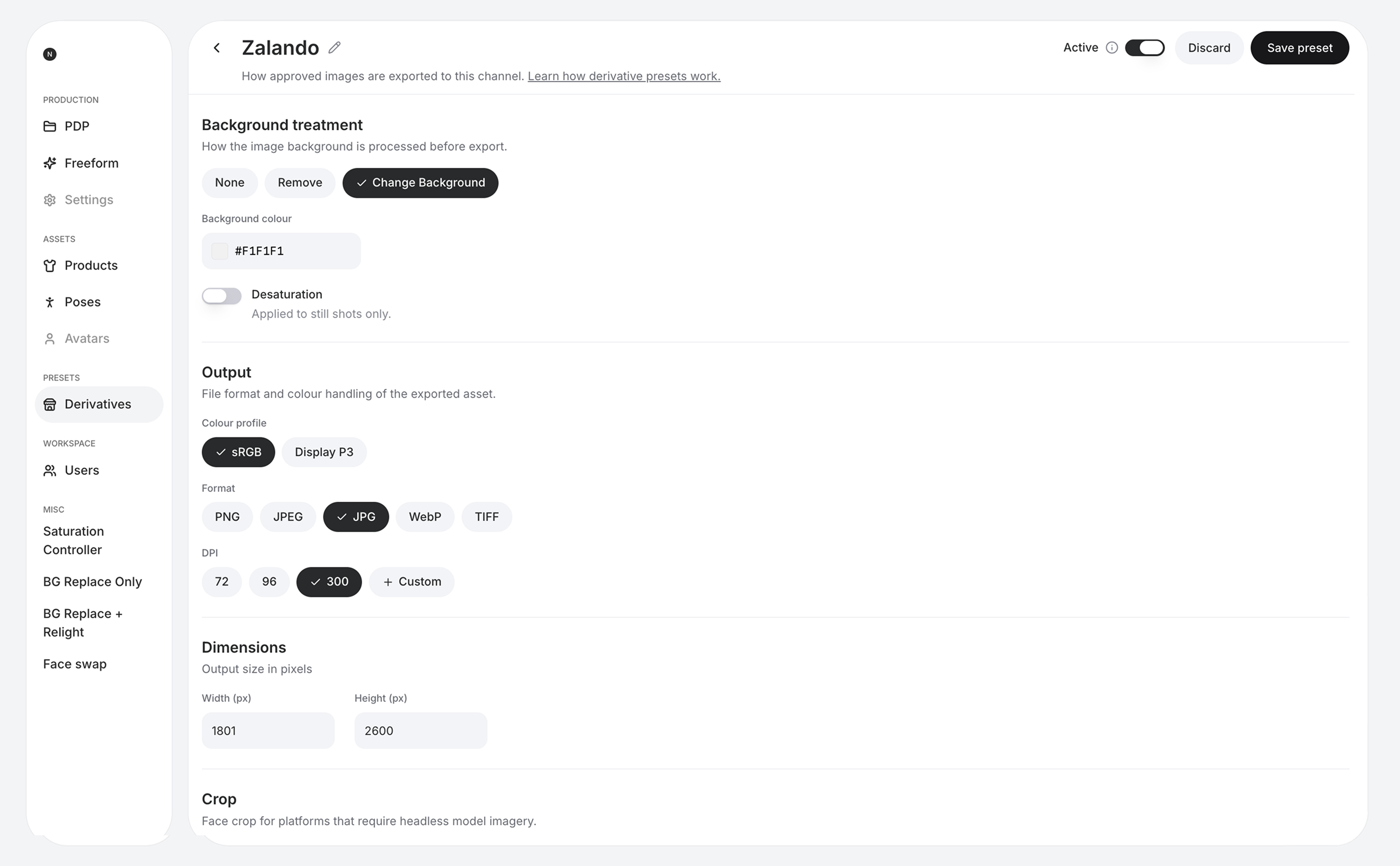
Presets also handle the channel rules that sit beyond the file itself. The subject margin controls how much space is kept around the model or garment. A face crop setting produces headless model imagery for platforms that require it, such as Amazon. And each channel gets its own file name template, built from variables like SKU, style code, position, and view code, so every delivered file follows that channel's naming convention automatically - one of the most time-consuming parts of manual export preparation, gone entirely.
Presets for major marketplaces come pre-filled with each marketplace's published requirements, so teams do not need to research or maintain the specifications themselves. Zalando, About You, Amazon, Breuninger, and Engelhorn are among the marketplaces covered.
Every setting in a pre-filled preset can be overridden, and teams can create their own presets from scratch - for a channel not yet covered, for the brand's own web shop, or for any internal specification.
The current preset specifications for four of the covered marketplaces:
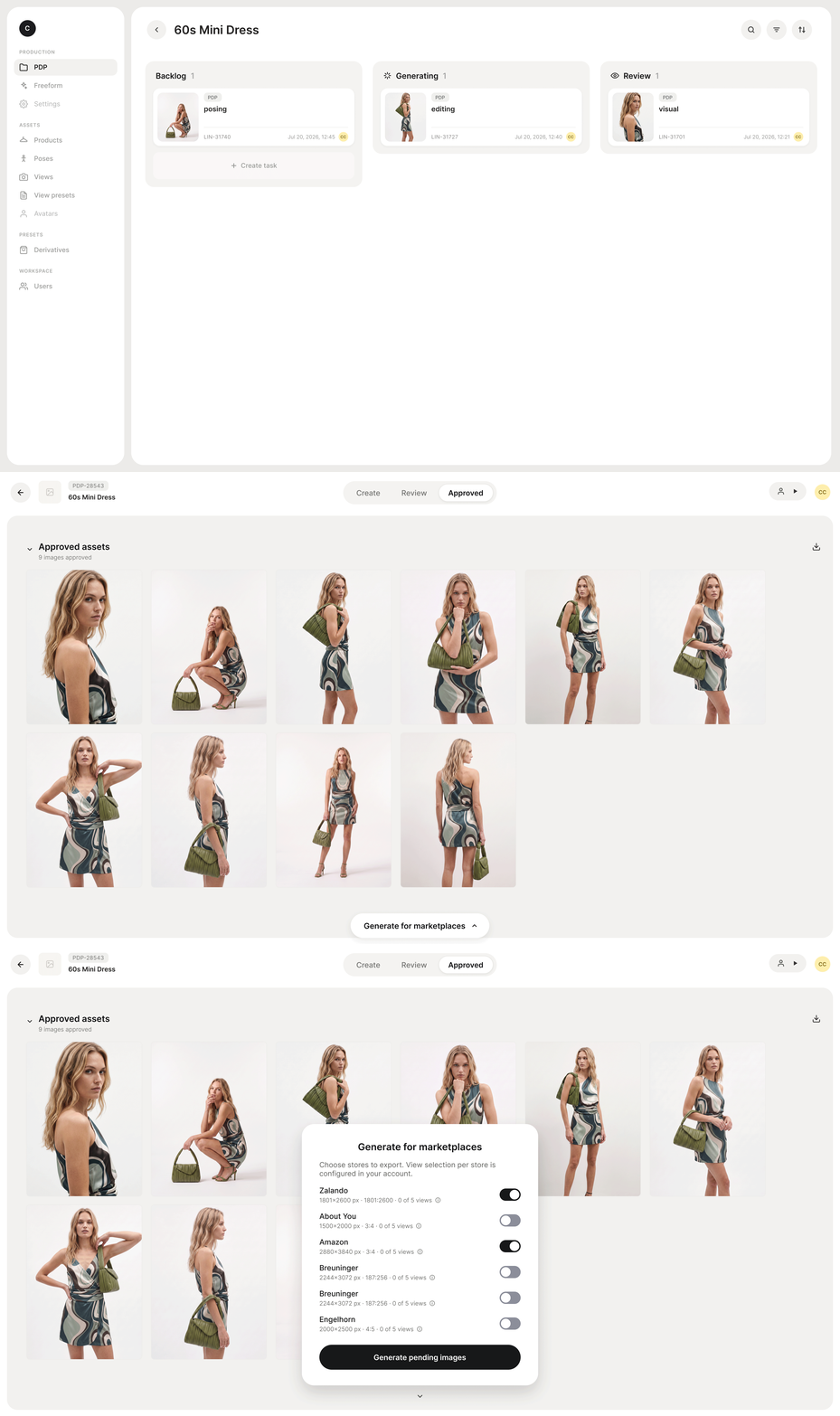
Exports happen from the approved set. Once a product's imagery is approved, the team selects which stores to export for - each channel with its own toggle - and generates the channel-specific outputs in one step. Which views are exported for which store is configured once in the preset's view mapping, organised by garment category - full body, tops, dresses, outerwear, accessories, and footwear - so a channel that needs a different view selection gets it automatically, on every product, without per-product decisions.
When a marketplace changes its requirements, the preset changes once. Presets can be edited at any time without touching derivatives that have already been generated. Tasks affected by a preset change are flagged as outdated, and teams regenerate them whenever they want the new settings applied. A specification update becomes a single edit rather than a re-export project - which is exactly the maintenance burden that scripts and DAM renditions never solved.
The approved image remains the single source. Presets define the outputs; nothing about the approved imagery itself changes. One approved set, every marketplace's specification, no post-production stage in between.
What this removes from the production cycle
Return to the arithmetic from earlier. The 500-SKU collection across three marketplaces still requires 6,000 channel-specific outputs - but none of them is a task anymore. The exports are generated from the approved set, to spec, at the moment the team chooses to export. The step that used to sit between approval and launch, at the point of maximum schedule pressure, is gone.
What remains is the decision that should always have been the only one: which channels does this product go to? Everything downstream of that decision - dimensions, formats, backgrounds, file naming, view selections - is handled by the preset.
For teams evaluating AI imagery platforms, this is also a useful test of what kind of tool they are looking at. A tool that generates images and stops has solved the most visible part of the production problem and left the rest in place. A production platform is accountable for the whole distance between a brief and a live PDP - and channel-ready export is part of that distance.
See how marketplace export presets work with your channels. Book a demo and bring your current marketplace list.
Quick answers to common questions
What image sizes do fashion marketplaces require?
Requirements differ per marketplace across dimensions, aspect ratio, file format, resolution, and presentation rules such as background treatment and cropping, and each platform publishes its own specifications. As reference points, Graswald AI's pre-filled presets export at 1801 × 2600 px JPG for Zalando, 2880 × 3840 px PNG for Amazon, 1500 × 2000 px JPG for About You, and 2244 × 3072 px JPG for Breuninger. Always confirm current requirements against each marketplace's own documentation, as platforms revise their specifications.
How do fashion brands export product images for multiple marketplaces at once?
Within Graswald AI, teams select the stores they want to export for on any product with approved imagery and generate all channel-specific outputs in one step. Each marketplace's preset defines the dimensions, format, and resolution of its exports, and view selection per store is configured once at account level.
Can I create my own export presets for channels that are not covered?
Yes. Presets for major marketplaces come pre-filled with each marketplace's published requirements, and every setting can be overridden. Teams can also create entirely custom presets for any channel or internal specification.
Do marketplace export presets change the approved image?
No. Presets define how approved images are exported per channel. The approved imagery remains the single source, and each channel receives an output generated to its specification from that source.
Does this work for on-model imagery created with AI avatars?
Yes. Marketplace export presets apply to approved imagery on the platform, including on-model imagery generated with a brand's exclusive AI avatars. The same approved on-model image can be exported to every channel's specification.
What happens when a marketplace changes its image requirements?
The preset is updated once, and every subsequent export follows the new settings. Derivatives that were already generated are not changed retroactively - affected tasks are flagged as outdated, and teams regenerate them when they want the updated specification applied.


.webp)









-p-1600.webp)






.webp)