.webp)
How to scale fashion product video across your catalogue without filming every SKU
You have seen the numbers. Video sells fashion. So you shot it - for the hero styles.
The lead styles of the new collection got the full treatment: a proper shoot, talent, a few days on set, motion that makes the garment move the way it does in real life. Those styles went live with video. They converted.
Then you looked at the rest of the catalogue.
The other few hundred SKUs launched the way they always do. A still image, if that. No motion, no movement, no sense of how the fabric falls when someone actually wears it. Not because video would not help them, it would, but because there was never the budget, the shoot time, or the schedule to cover them.
This is the quiet trade-off most fashion brands have made with video. It works, everyone knows it works, and it still only reaches a fraction of the garments that could benefit from it.
This guide is about closing that gap. Why fashion product video converts, why it has stayed locked to hero styles, why the usual workarounds do not scale, and how to produce on-brand on-model video across your whole catalogue from the imagery you already have.
Why fashion product video converts, and why it is worth the trouble
Start with what shoppers actually want. People prefer to watch before they buy. In Wyzowl's 2026 video report, 85% of people said they had been convinced to buy a product or service after watching a video, and 63% said a short video was their preferred way to learn about a product before deciding. That preference shows up directly on the PDP.
A PDP that includes video converts better. The figure cited most often across the industry puts the uplift at up to 80% compared with pages without video. The effect is pronounced in fashion, because a garment is something shoppers genuinely want to see in motion. Motion holds attention, shows how a piece moves and drapes, and answers questions a still image cannot.
And video does something a still image struggles to do. It sets accurate expectations.
A shopper who has seen how a garment moves, drapes, and fits is far less likely to be surprised when it arrives. That matters in every category, but it matters most in fashion, where return rates run higher than almost anywhere else, by some European measures up to around 64%. Product video has been shown to cut returns by up to 35% by closing the gap between what a customer expects and what turns up in the box. In a category where fit and fabric drive most returns, fewer returns is margin you keep.
So the case is not in doubt. The question has never been whether video works for fashion. It is whether you can afford to do it everywhere it would work.
Why on-model video stays locked to hero styles
Traditional fashion video is expensive, and the expense is front-loaded into a shoot.
A professional fashion video shoot - concept, crew, models, location or studio, lighting, multiple set-ups, then post-production - sits somewhere between €10,000 and €50,000 and upwards, depending on scope. Even a simpler clip carries the cost of a shoot day, an editor, and a turnaround measured in weeks rather than hours.
That cost does not scale neatly with your catalogue. It compounds.
More colourways means more set-ups. More markets means more variants. A late sample means a reshoot. Every garment you want to cover adds shoot time, and shoot time is the one resource that is genuinely finite. There are only so many days, so much budget, and so many people to brief.
So a decision gets made, usually without anyone deciding it on purpose. Video goes to the styles that can justify the spend: the hero pieces, the campaign looks, the launches with a number attached. Everything else, the long tail, the colourway expansions, the secondary placements, goes live static and tends to stay that way.
The result is a catalogue split in two. A small set of styles presented at their best, and a much larger set presented at a fraction of their potential, on exactly the format proven to convert.
What fashion brands try, and why it does not close the gap
The usual responses each solve part of the problem and leave the rest.
Some brands shoot video only for hero styles and accept the gap. It is the honest version of the trade-off, and it leaves most of the catalogue without the format that converts best.
Some commission a large campaign shoot and try to stretch the footage across more SKUs. The hero film looks excellent. The long tail still has nothing of its own, because the shoot was never scoped to cover it.
Some turn to generic AI video tools to fill the gap quickly. The speed is real. The output usually is not on brand: the wrong proportions, an avatar that is not yours, motion that looks synthetic, a logo or print that drifts. For an enterprise fashion brand, off-brand video is worse than no video, because it undermines the visual identity you have spent years building.
And some simply wait. For next season's budget, for a quieter week, for the schedule to open up. The window rarely does. The next collection arrives before the last one was ever fully covered.
The common thread is that all of these treat video as a shoot. A shoot has a fixed cost and a fixed capacity, so the sums never work at catalogue scale. To cover the whole catalogue, video has to stop being a shoot and start being a step you can run on the imagery you already have.
The approach that scales: generate video from the on-model images you already have
Here is the shift. The expensive part of fashion video is not the motion. It is the shoot that produces the footage. If you already have the on-model imagery, motion is the only missing layer, and motion does not require another day on set.
You have already done the hard part. The on-model image is generated, reviewed, approved, and on brand. It has the right avatar, the right styling, the right lighting, the right crop. Turning that approved image into a short, on-brand video is a production step, not a new production.
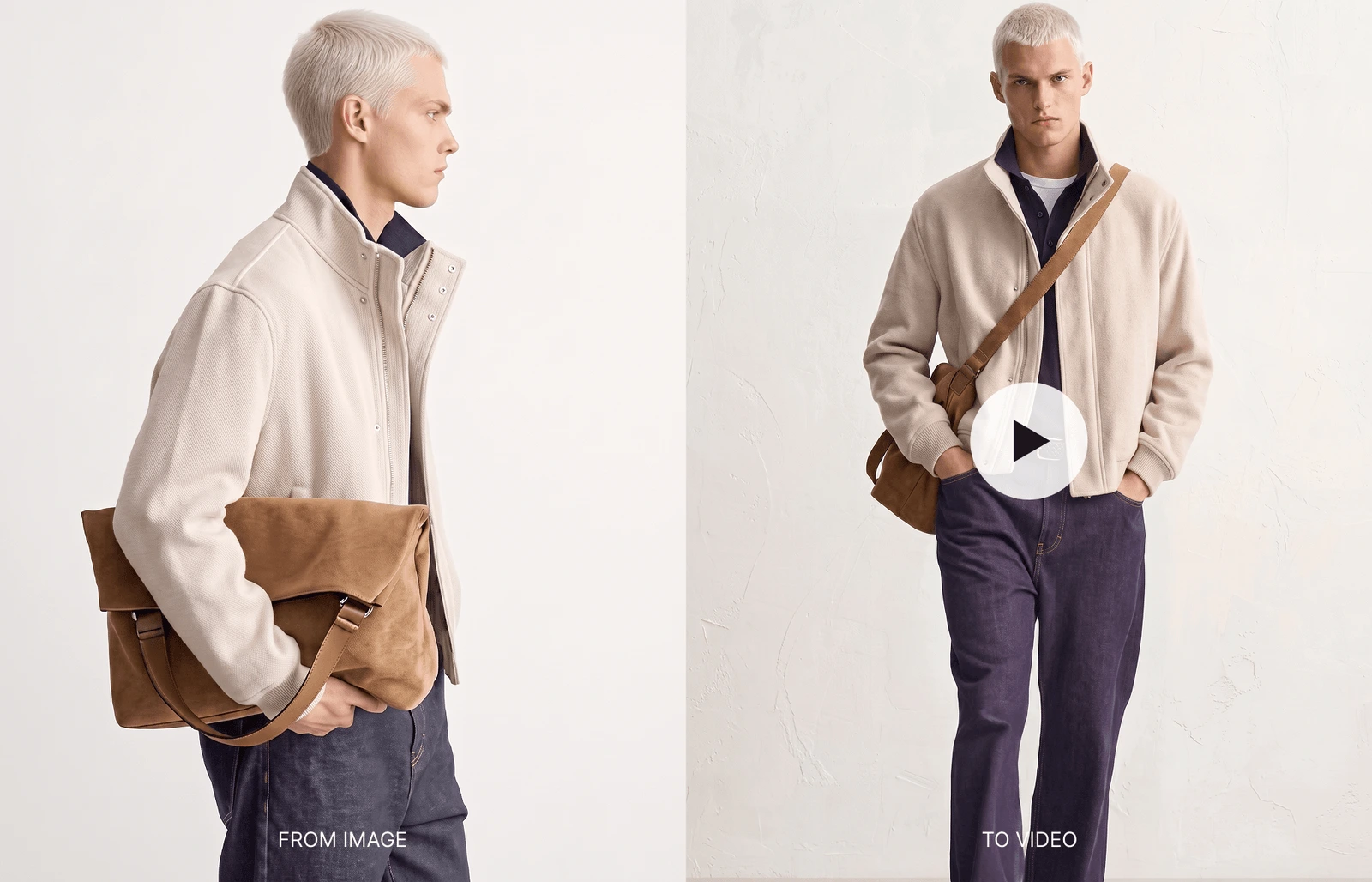
This is image-to-video. Rather than filming a garment, you take the on-model image that already passed review and generate movement from it, the garment turning, the fabric settling, or the model shifting weight, so the piece is shown in motion without anyone returning to a studio.
Because the starting frame is your approved on-model image, the video inherits everything that made the image on brand. There is no fresh roll of the dice on proportions or styling. The motion is added to imagery you have already signed off, which is what makes it safe to run across hundreds of SKUs rather than only the few you could afford to film.
That is the principle. Here is how it works in Graswald AI.
How image-to-video works in Graswald AI
Graswald AI is the AI production studio for fashion brands, the platform where teams generate on-model imagery from the inputs they already have. The video feature lives inside it. It turns your approved on-model images into short, on-brand videos for your PDPs, marketplaces, and social channels, in the same workflow you already use to generate imagery.
The whole process runs inside the PDP section, from setting up a video-enabled project to stitching clips into a final downloadable video.
Setting up a video project
Note: the video feature can only be enabled on a new project. If a project already exists, you cannot add the feature to it, so you will need to create a new project.
To set up a video-enabled project:
- Go to PDP and create a new project.
- Give the project a name.
- Under Task Types, toggle on the Video feature.
- Complete the project set-up as usual.
Moving tasks through the video workflow
With the video toggle enabled, the PDP section looks much like the standard image generation view, with one addition: three navigation icons to filter your tasks.
- All shows every task, both image generation and video.
- The person icon shows image generation tasks only.
- The video icon shows video tasks only.
The flow is straightforward. Once an image generation task is approved and moves to the Approved stage, it enters the video backlog automatically. From the backlog you configure and trigger video generation. The task then moves to Generating, and into the Review tab once it is complete
Configuring your clips
When a task is in the video backlog, select it to open the clip configuration view. From here you can:
- Reorder clips. Drag and drop to change the order the views appear in the final video.
- Edit prompts. Click the pencil icon on a clip to review or adjust the preset prompt for that view. Prompts are pre-configured for your account based on the requirements you gave us, and you can change them to suit the movement you want.
- Change the start image. Each clip uses a generated image as its starting frame. Click Change Start Image to use a different one.
- Set the number of runs. By default each clip generates three variations (runs) to choose from, and you can adjust this before generating.
When the configuration is right, click Generate. The task moves from the backlog to Generating.
Note: each clip is approximately five seconds long, so a task with four clips produces a final video of around 20 seconds.
Reviewing and creating your video
Once generation finishes, the task moves into the Review tab.
- Select the task and go to the Create section.
- You will see the generated clips, with one set of runs per view (for example, three options per clip).
- Use the left and right arrows to move between the runs for each clip and pick the one you prefer.
- To refine a clip, click the pencil icon to adjust the prompt, change the number of runs, or swap the start image, then regenerate that clip.
- To keep an individual clip on its own, use the download icon to save it as a standalone file.
- When every clip is right, click Create Video to stitch the selected clips into one complete video.
Downloading your final video
After you click Create Video:
- The finished video appears in the review view.
- Click it to preview it at full size.
- When you are happy, click Download to save the complete video.
If the final video is not quite right, you can go back, adjust individual clip selections or prompts, and click Create Video again.
Set up, configure, review, download. The whole workflow runs on on-model imagery you have already approved, which is what lets it scale past the hero styles.
What full-catalogue video means for your brand
When video stops being a shoot and becomes a step you run on existing imagery, the economics change.
The cost per video falls from the price of a shoot to the cost of a generation. The styles that never justified a film, the long tail, the secondary colourways, the late-arriving SKUs, can now carry video too, on the same format that lifts conversion and lowers returns on the hero styles.
Coverage stops being a budget decision and becomes a workflow one.
Because every video starts from an approved on-model image, consistency holds across the catalogue. The avatar, styling, and lighting you locked in carry through to the motion, so a long-tail SKU looks like it belongs next to the hero piece rather than like a cheaper afterthought. That is the difference between filling the gap and filling it on brand.
It compounds at volume. One garment without video is a small miss. The same gap across a collection of hundreds of SKUs is conversion left on the table on every PDP, every season. Generating video in the same workflow that produces your imagery keeps the per-style cost low enough that video coverage can scale at the pace of your catalogue rather than the pace of your shoot schedule.
If you are mapping how this fits your production timeline, it is worth reading how Graswald AI increases speed to market for e-commerce brands, and how brand-consistent AI avatars support greater personalisation and localisation while optimising costs. Image-to-video is the layer that brings that imagery to life. And when a specific detail has to be exact, Detail Fixer corrects it against your original input before the image ever becomes a video.
There is more on the roadmap. Book a demo if you want to see how image-to-video fits into your workflow.
.webp)



-p-1600.webp)

.webp)